If you use a Windows hosting, sometimes after embedding video into your webpage, uploading to a Microsoft Windows 2003 server and then viewing in a browser the player says that the “specified file is missing”. The SWF file (flash player) shows correctly, but the FLV video does not stream.
Microsoft Internet Information Server (IIS) 6.0, the default web server that ships with Windows 2003, requires a MIME type to recognize that FLV files are streamed media.
How to configure MIME types on Windows Server to recognize FLV files
Run Internet Information Server
Log on the Windows 2003 server and run the Internet Information Services Manager.
Go Start > All Programs > Administrative Tools > Internet Information Services (IIS) Manager
Note: If you do not have access to the server, please send this guide to your hosting provider or administrative contact.
Open MIME Types Configuration Window
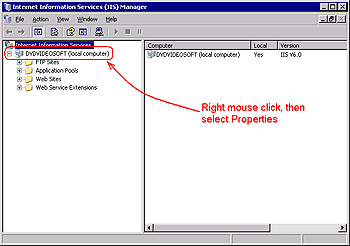
Right-click the local computer server and select Properties.
Then click the MIME Types… button
Add New MIME Type
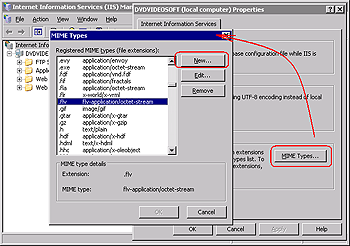
Click New and enter the following information.
Associated Extension box:
.FLV
MIME Type box: flv-application/octet-stream
Click OK.
Restart World Wide Web Publishing Service
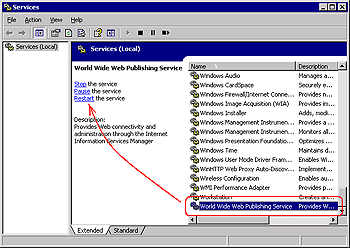
Go Start > All Programs > Administrative Tools > Services
In the list of services find the World Wide Web Publishing service and click Restart.